CasinoGrounds 2.0 is here! - Community Feedback

Status
Not open for further replies.
Love the look and feel of the website. But one thing I would love is a dark background. Maybe make it possible to choose from light and dark? Unfortunately spammer is active again forum. Jesus get a life, seriously 

 
Hey Skylined. Using iPhone each time you click a new topic it opens up a new page. Don’t like background pages running..... anything that can be done?

 
Hey Skylined. Using iPhone each time you click a new topic it opens up a new page. Don’t like background pages running..... anything that can be done?
Hi @Marcossvon! 

I will check tomorrow and get back to you. If I understand correctly, this happens each time you open an existing topic (not create), right?

 
Hello, there's a bug for me. When you are login in the website through and go in points- cg points site it will automatically log you out, although you haven't. Is this different? Or is there 2(forum and main site) accounts requirements? @Skylined87

 
Hello, there's a bug for me. When you are login in the website through and go in points- cg points site it will automatically log you out, although you haven't. Is this different? Or is there 2(forum and main site) accounts requirements? @Skylined87
Hey @Gyoza,

I assume you're referring to "REGISTER" button, correct? It's merely a visual "issue" which will be resolved in near future. If you click on the forum, you will still be logged in, as it's the only system that uses login function :)

 
Hey Skylined. Using iPhone each time you click a new topic it opens up a new page. Don’t like background pages running..... anything that can be done?
Hey @Marcossvon,

I have just tested it with an iPhone. I tried built-in browser and Chrome. Neither produced the bug you experienced. 

Can you try to describe what are you doing in more detail if possible?

Also, try clearing out the cache / cookies and try the actions again - see if it repeats.

 
Hey @Gyoza,

I assume you're referring to "REGISTER" button, correct? It's merely a visual "issue" which will be resolved in near future. If you click on the forum, you will still be logged in, as it's the only system that uses login function :)
Yes, that's right, is the merchantdise available yet? And where do you see your points?

 
@Skylined87 hi skylined. Couple of problems i have run into. On my own personal account page.

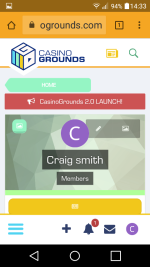
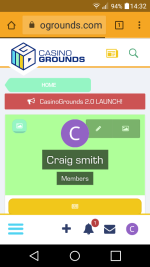
1- i am unable to load up a picture onto the area behind my blue letter C. i have tried and the picture loads up as normal but for it to go onto my space behind the letter C i need to be able to press the SAVE marker. The screen will not run up high enough to show the word SAVE. I have tried multiple times and it will not budge. The background stays as i am doing what im trying to do,  and as i try and scroll up to get to the save.  Instead of the page i am working with scrolling up, its the background page that scrolls up up up. Somehow a design has popped onto my area with my blue C, and when i go to my home page it comes up lime green then the design that has somehow appeared shows. I dont like it to be honest and if possible could you turn the background back to the normal dark glazed background round about my blue C. Thankyou skylined.

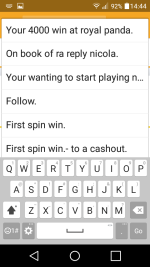
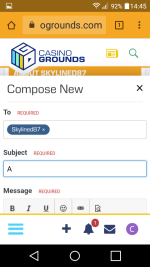
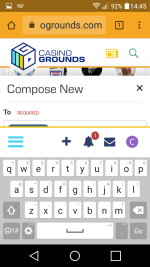
2- i was trying to PM you this and when i tried i could not get passed writing the heading to what i was going to say to you. It was like it froze and the screen i was wanting to type on would not move up. I had to abandon the PM and do it here. Also when i went to write the heading i was swamped by all previous headings i have written for PM's and there was no room at all. It was like the screen froze and would not move and all these headings appeared above the heading i was about to write to start my message to yourself. Which is this message im typing up now. I am on mobile skylined and i think there is a few glitches left on the new site. But i am better to tell you so you no and can take a look. There is less space now because of the menu, the plus, the bell, the letter and my initial. It does keep them all right at hand though and that is a good change. Im used to the site but came across those 2 problems today. If you could take a look. Thankyou. Craig smith.

Below is my home page design problem. Can you remove that back to the normal clear dark background. Thankyou.  I can load a background picture up but i cant get to the (save ) to process whatever picture i am trying to put on as a background. I will try and load more on to give you a visual idea. Thankyou.

Also to give you an idea of when i went to private message i got this. And could not scroll the screen up from- subject. This is as low as i can get my keyboard on my mobile also. I hope the pictures help skylined. Pictures below. Thanks.

Screenshot_2018-06-26-14-33-06.png

Screenshot_2018-06-26-14-33-01.png

Screenshot_2018-06-26-14-44-36.png

Screenshot_2018-06-26-14-45-21.png

Screenshot_2018-06-26-14-45-11.png

 
Last edited by a moderator:
Hey @Craig smith,

I've updated the profile background picture. If you'd like me to change your profile picture let me know.

As for the issue you're describing, will have a look but cannot promise anything. It seems your phone has extremely small screen size.

 
Hey @Craig smith,

I've updated the profile background picture. If you'd like me to change your profile picture let me know.

As for the issue you're describing, will have a look but cannot promise anything. It seems your phone has extremely small screen size.
Thankyou skylined for sorting my home page. I like the new pink letter C. 

I would agree that my screenspace is a bit small. On the new website its smaller. On the old one it was fine. 

Thankyou for the help.?.

 
Thankyou skylined for sorting my home page. I like the new pink letter C. 

I would agree that my screenspace is a bit small. On the new website its smaller. On the old one it was fine. 

Thankyou for the help.?.
Just checked on the sizing, I don't think there's much more we can do unfortunately, as it would require a complete remake of the forum theme. When you can, upgrade your phone to one with a larger screen :)

 
Hi @Skylined87 This may have been mentioned previously but on the mobile version the menu icon is in the bottom left of the screen.  This makes it rather awkward to swipe (for me at least) as I (and probably and lot of mobile users do) swipe the screen from the bottom left and upwards.  With the menu icon being there it kept opening the menu up instead of scrolling the screen which was what I was trying to do.  Also being in that position will most likely get in the way of a users OSK and make it hard for them to type.


 
Hi @Skylined87 This may have been mentioned previously but on the mobile version the menu icon is in the bottom left of the screen.  This makes it rather awkward to swipe (for me at least) as I (and probably and lot of mobile users do) swipe the screen from the bottom left and upwards.  With the menu icon being there it kept opening the menu up instead of scrolling the screen which was what I was trying to do.  Also being in that position will most likely get in the way of a users OSK and make it hard for them to type.
Hey @Rachel_JM!

I see what you mean, you're probably left handed? The menu never represented issue for me as I use phone in my right hand and do swiping on right side. But will see if anything can be done regarding that.

 
Status
Not open for further replies.
Back
Top